
Migrate Lovable Cloud to Your Own Supabase — Without Leaving Lovable Chat
Lovable can now call Staticbot directly. Add one MCP connector and the assistant you already build with can move your database, auth, storage and edge functions onto a Supabase project you own — and deploy the frontend to your own hosting — from the same conversation.
You never have to leave the place you build in
Moving an app off a builder's managed backend normally means learning a second product. The builder in one window, a migration tool in another, a Supabase dashboard in a third, and a checklist you keep losing your place in. Even when each individual step is easy, the tab-switching is what makes the whole thing feel risky.
With the connector in place, none of that happens. You stay in Lovable, in the same chat you have been building in, and simply say what you want. Lovable's assistant does the work — Staticbot is just a tool it reaches for, the same way it reaches for anything else. There is no second dashboard to learn, no new vocabulary, no context to rebuild every time you switch windows.
The assistant only interrupts you when a decision is genuinely yours to make. Approving what gets migrated. Choosing the target project. Deciding what happens to something already sitting in it. The rest it handles — including a step that used to send you back to Lovable chat by hand, because now it is already there.
That is the whole idea: Staticbot blends into Lovable rather than competing with it. You keep the tool you like, and your app quietly ends up on infrastructure you own.
What you still leave chat for
Being straight about this, because "do everything from chat" is the kind of claim that wastes your afternoon when it turns out to be 90% true. You open a browser for exactly two things, both one-time:
Adding the connector
Lovable's Connectors screen, once per workspace. Two fields and an authorize button.
Connecting GitHub and Supabase
OAuth consent screens live in a browser by nature. Once per account, at app.staticbot.dev.
Everything after that — choosing the repo, approving what gets migrated, picking the target project, resolving conflicts, deploying the frontend — happens in the Lovable conversation. A custom domain needs DNS records at your registrar, but that is after the migration, and Staticbot can push them for you if your domain is on a connected Cloudflare account.
Step 1: Add Staticbot to Lovable
Custom MCP servers work on every Lovable plan. On Business and Enterprise workspaces an admin can switch connectors off — if you cannot find the Connectors screen, that is the thing to check.
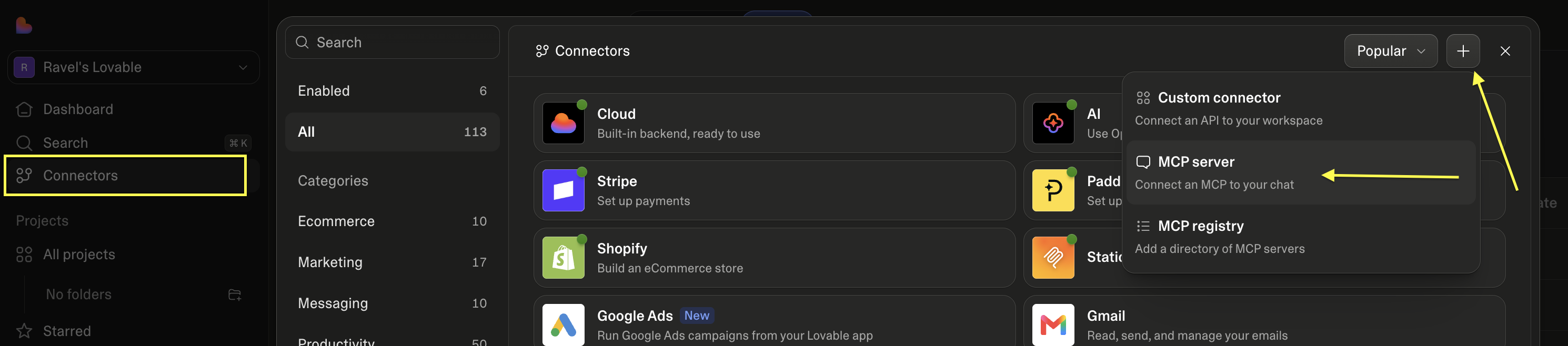
Open Connectors, then + → MCP server
Connectors sits in Lovable's left sidebar. The plus button at the top right of the panel offers a custom connector, an MCP server, and an MCP registry — you want MCP server.
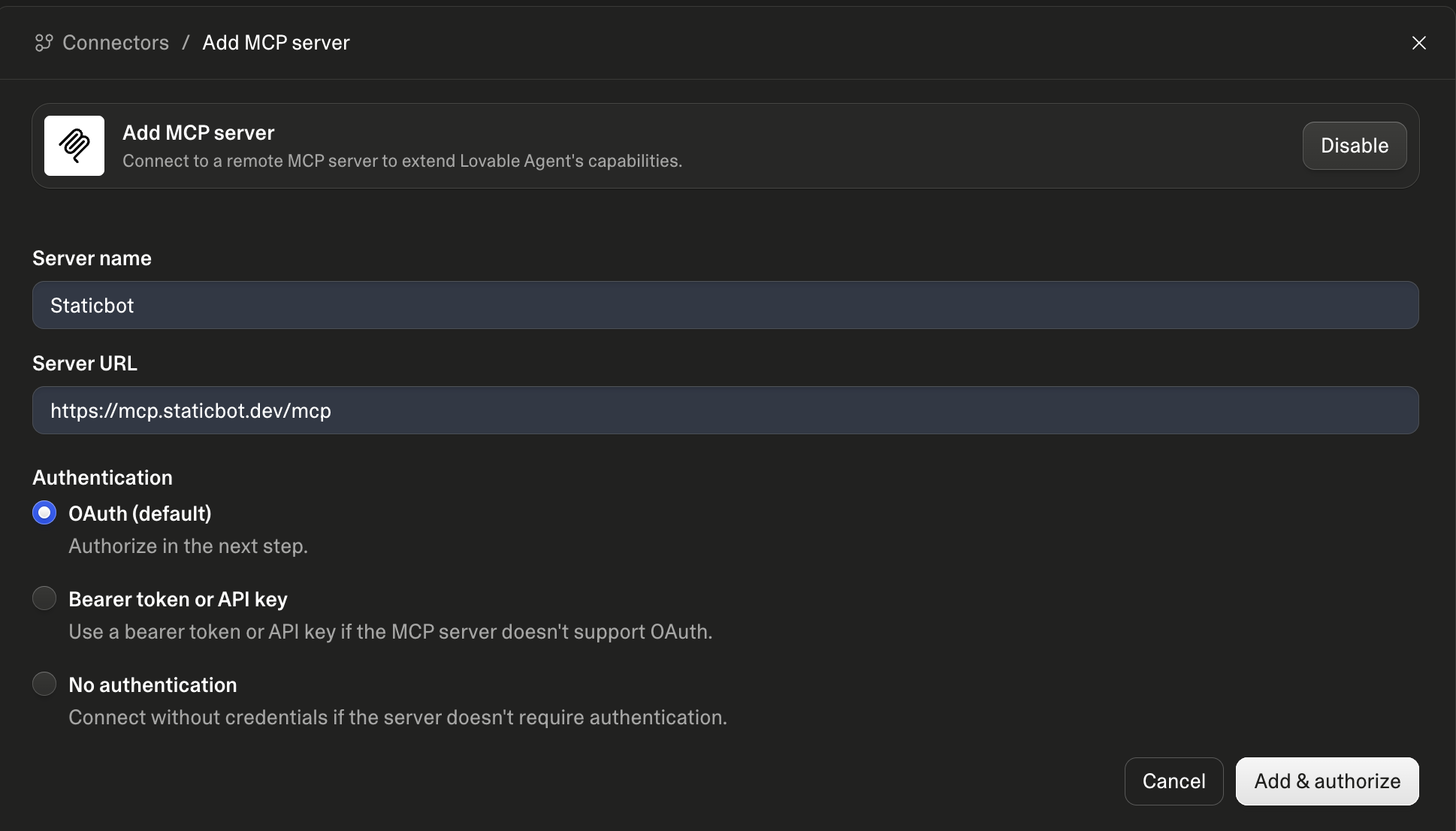
Fill in two fields, keep OAuth, authorize
Leave authentication on OAuth. "Add & authorize" opens a Staticbot sign-in — use the account whose integrations you want Lovable to work with, or the connection lands in the wrong workspace.
Step 2: Connect GitHub and Supabase
Staticbot needs to read the repository Lovable pushes to, and it needs somewhere to migrate into. Both are OAuth connections you make once at app.staticbot.dev/integrations .
You do not have to guess whether you are ready. Ask in Lovable chat and Staticbot answers with what is connected, what is missing, and a link to fix it:
What's connected in my Staticbot account?
GitLab works everywhere GitHub does. If you have several accounts connected, Staticbot tells the assistant which one each repository lives in, so it can pick the right one rather than guessing.
What it looks like when it is working
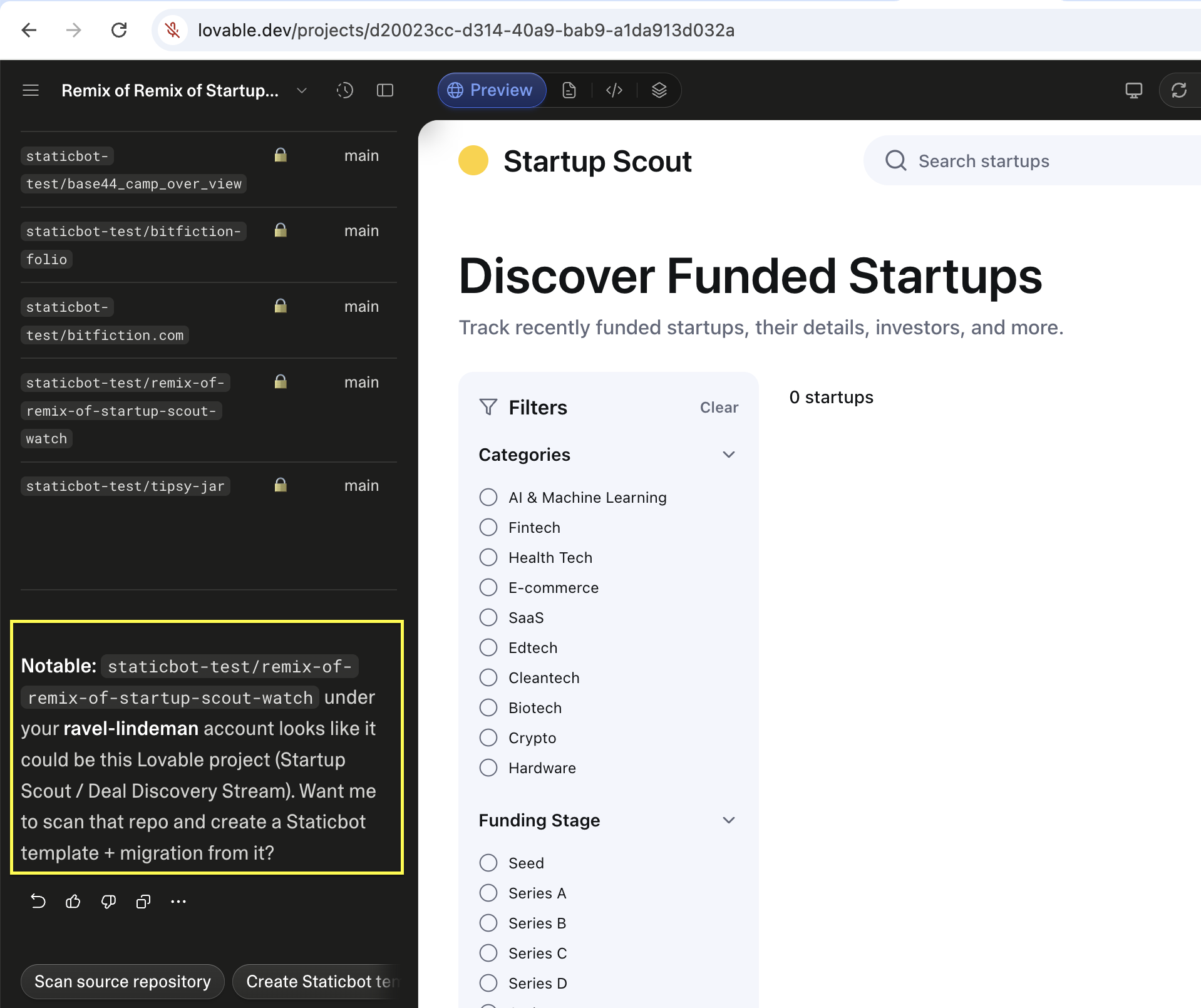
Here is that question answered inside Lovable — the assistant listing your repositories through Staticbot and working out which one is the project you have open. The app preview on the right is the Lovable project itself; nothing has been changed.
Private repositories
Every repository in that list is private. Staticbot reads them through your connected account, so you never have to make anything public.
Which account owns it
Connect two GitHub accounts and the same repository name can exist in both. Staticbot tells the assistant which account each one came from, so it picks the one that can actually read it.
It offers, you decide
Staticbot reports what is possible — hosting this app, or migrating its backend — and what each still needs. Which one happens is your answer, not the assistant's assumption.
Step 3: Ask for the migration
Now say what you want in plain language. Lovable already knows which project you are in, so you rarely need to spell out the repository:
Use Staticbot to migrate this app's backend off Lovable Cloud
and onto my own Supabase project. Stop and show me what you
found before changing anything.
That last sentence is not required — Staticbot pauses for approval after discovery whether or not you ask — but saying it out loud tends to make assistants narrate the inventory properly instead of racing ahead.
What happens, and where it stops for you
Discovery
Staticbot inventories the source — tables, edge functions, storage buckets, auth providers, migration history — and checks whether a Lovable Cloud Data export exists. Handled for you inside the conversation.
Your approval
The migration pauses. The assistant shows you what was found and what it intends to move. Nothing is written to your target until you say go.
Choice gates
Where a real decision exists — restore from the official export or replay migration files, how to import data, what to do about objects already in the target — Staticbot surfaces the options and their consequences rather than picking for you.
Schema, data, storage, functions
Applied to your Supabase project in order. If a Cloud Data export is available, users come across with their existing passwords intact — no forced reset.
Preview
Staticbot deploys the migrated app against the new backend so you can click around before anything switches over. A preview proves it works; it does not commit you.
Frontend deploy
Staticbot reads the repository and picks the target the workload needs — Cloudflare Workers for server-rendered apps, AWS for static sites and SPAs — on its infrastructure or a cloud account you own.
Why move off Lovable Cloud at all
Keep building in Lovable. That is the point — this is not a “leave Lovable” pitch. What changes is where the app actually lives: a Supabase project on your own account, with your own keys, and hosting you control. Your database stops being something you can only reach through someone else's dashboard, and your app stops depending on a plan staying active.
Migrations are free, for every source Staticbot supports. Hosting is cheap.
And you can take it with you
This is the part most people do not believe until they read it twice. Staticbot will host your app, cheaply, and that is the easy path. But the moment you would rather run it in your own Cloudflare or AWS account, Staticbot deploys the very same stack there instead — and hands it over. Not an export. Not a migration away from us. The same infrastructure, in an account with your name on the bill.
Which means the decision you are making today is reversible. You are not trading one platform's lock-in for another's — that would rather defeat the point of migrating in the first place.
How owning your own stack worksAdd the connector and ask it something
Two fields in Lovable's Connectors screen. Then just ask what is connected — you will see the answer come back in chat before you change a thing.
Related
- Lovable → Supabase migration guide — the full pipeline, gate by gate
- Deploy a Lovable app — hosting without migrating the backend
- Migrating via MCP from ChatGPT, Claude Code and Codex — the same tools, other chat surfaces
- Staticbot MCP server — every supported client
Own the backend. Keep the builder.