
Download Your Project as a Migration Package — Apply with Claude Code
Targeting a self-hosted Supabase that lives inside your VPC? Staticbot doesn't need network access to it. We run discovery + export against the source, then hand you a password-protected ZIP. Claude Code (or Codex/Gemini) applies it locally.
Ravel works on Staticbot’s migration platform, moving apps built with Lovable and Base44 onto Supabase and hosting their owners control.
If your target Supabase is reachable from the internet (e.g. a hosted Supabase project), Staticbot can run the migration end-to-end in the cloud. If it isn't — because it's self-hosted inside a private VPC, on a Tailscale net, or behind your own firewall — the downloadable package gives you the same migration without exposing anything. Same migration work end to end — discovery, schema, data, storage, functions, secrets and cron — the apply step just runs on your machine instead of ours.
When to use the downloadable package
Self-hosted Supabase
Your target lives in a VPC, on-prem, or behind a firewall Staticbot can't reach.
Compliance / sovereignty
You'd rather have data flow through your own machine and your own network — not Staticbot's infra.
You already live in your editor
Claude Code, Codex, Gemini CLI. You'd rather drive the apply step from a terminal you already trust.
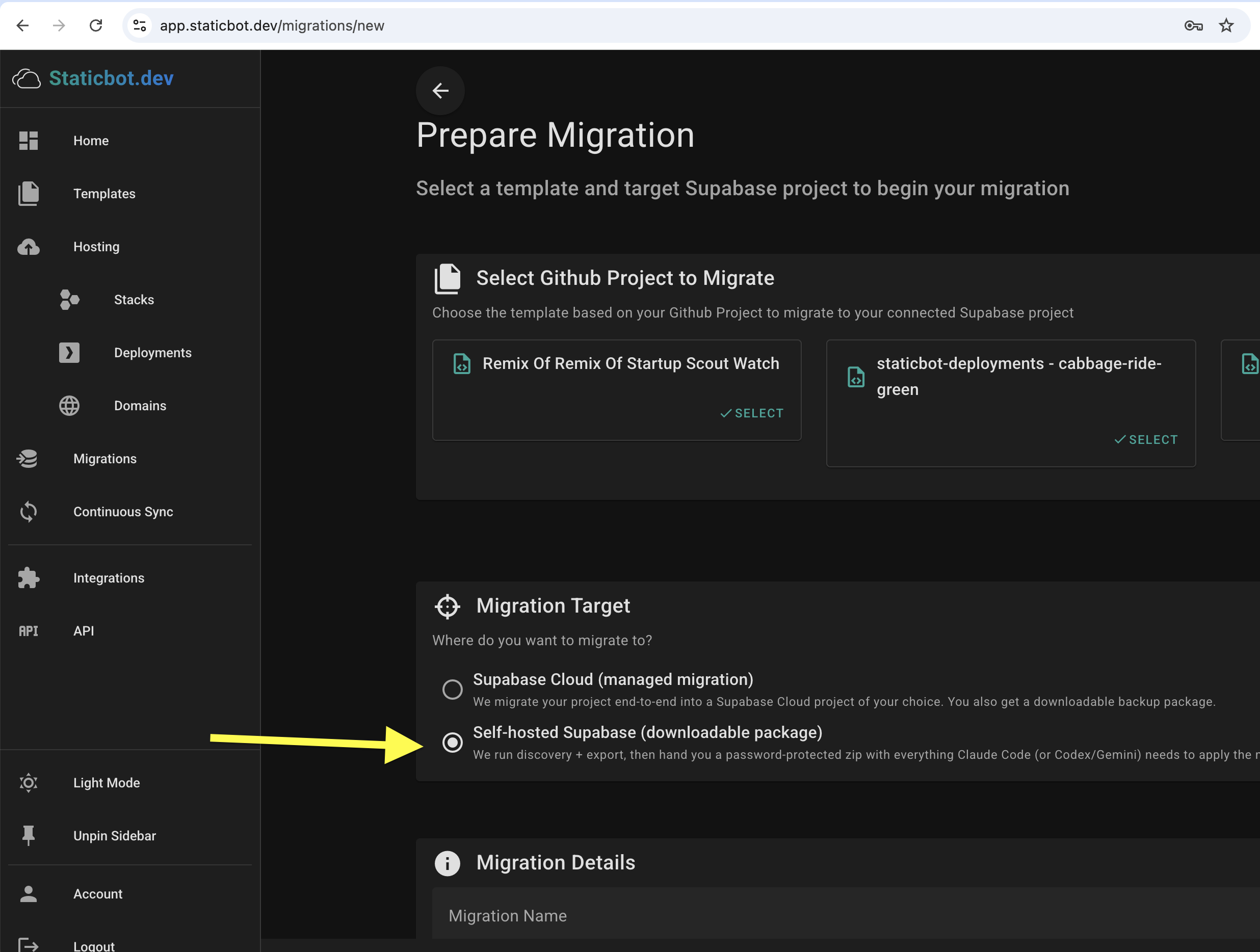
Step 1 — Pick "Self-hosted Supabase (downloadable package)" as your target
When you create the migration, choose the second option under Migration Target. Staticbot will run discovery and export against the source (Lovable Cloud, hosted Supabase, etc.) — but instead of writing into a live target, it will bundle the output into a downloadable ZIP.
Step 2 — Let Staticbot run discovery and pack the export
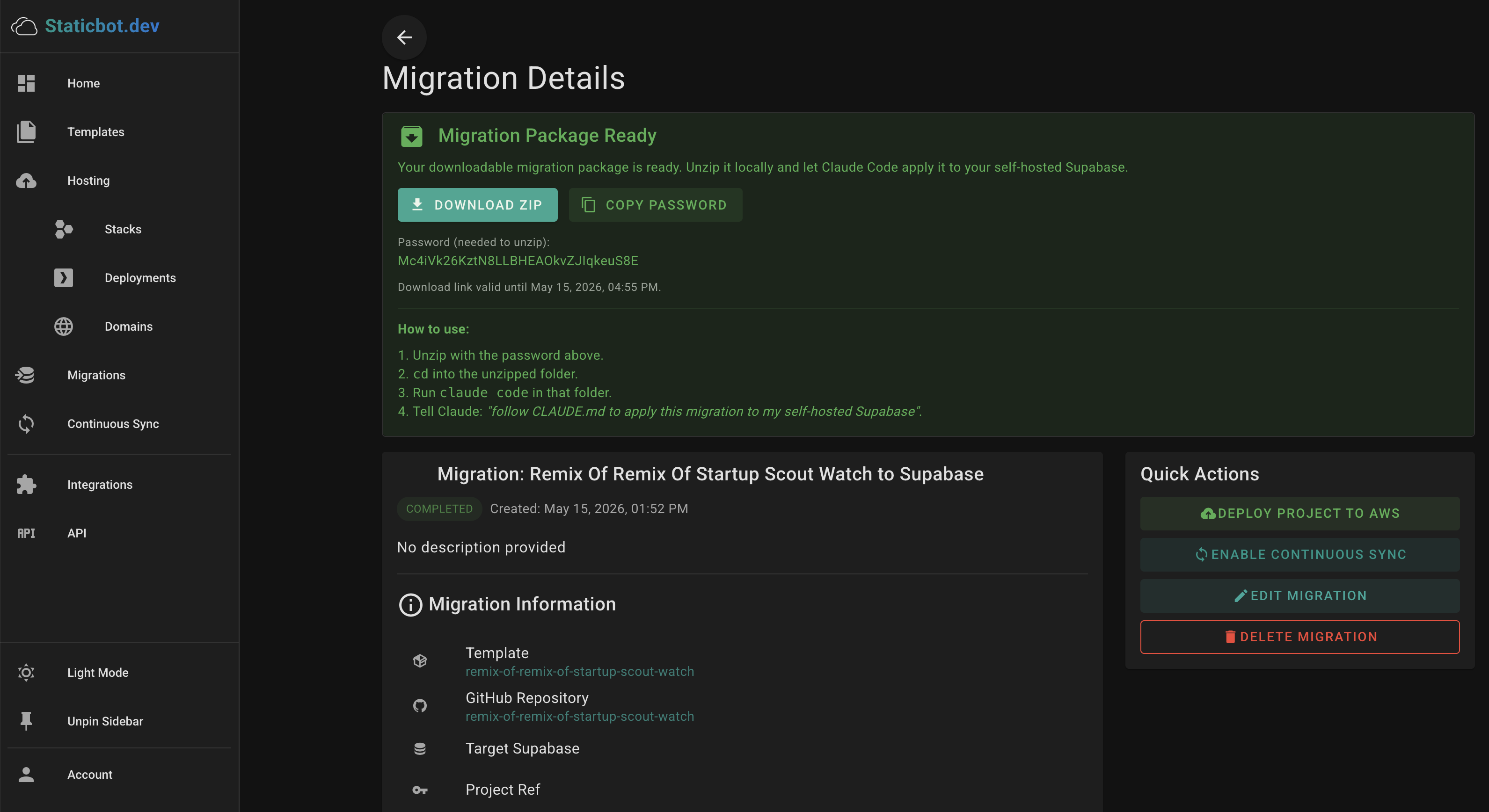
Same first half of the pipeline as a cloud-managed migration: Staticbot inventories your source project (schema, data, storage objects, edge functions, auth users, OAuth identities, secrets, cron jobs), exports everything, and assembles it into a single archive. When it's ready, the migration details page shows a "Migration Package Ready" panel with a download link and an unzip password.
What's inside the package
Everything the apply step needs, plus a CLAUDE.md that tells Claude (or Codex/Gemini) what to do with it.
Ordered SQL migrations
Schema and dependency-ordered DDL ready to run via psql.
Data dumps
Table rows in dependency order so foreign keys resolve cleanly.
Storage objects
Buckets and files, ready to upload to your self-hosted Storage API.
Edge function source
All edge functions from the source, deployable via the Supabase CLI.
Auth users + OAuth identities
Recreated on the target so existing users can sign in unchanged.
Secrets + cron jobs
Vault secrets and pg_cron schedules captured for reapply.
Step 3 — Unzip and open the folder
The archive is AES-256 password-protected — copy the password from the dashboard and use it to unzip. From the migration details panel, the actual flow is four short steps:
# 1. Unzip with the password from the dashboard
unzip -P "<password>" migration-package.zip

# 2. cd into the unzipped folder
cd migration-package

# 3. Run Claude Code in that folder
claude code

# 4. Tell Claude what to do
> follow CLAUDE.md to apply this migration to my self-hosted Supabase
The download link is time-limited (a few hours) — once you've downloaded the ZIP locally, you can re-run the apply as many times as you want against a clean target.
Step 4 — Claude follows CLAUDE.md and applies
The bundled CLAUDE.md is a generic apply script. Claude reads it, asks for your self-hosted Supabase connection details (Postgres URL, service role key, storage endpoint), and then runs the same phases a cloud migration would — locally, against your instance:
DB Migration
Applies ordered SQL migrations via psql; enables required Postgres extensions.
Data Import
Imports table rows in dependency order, then uploads storage objects.
Edge Functions
Deploys each edge function to your self-hosted Supabase via the Supabase CLI.
Auth + OAuth identities
Recreates auth users and links each OAuth identity (Google, GitHub, etc.) to the right user.
Secrets + cron
Reapplies vault secrets, env vars, and pg_cron scheduled jobs.
Verify
Sanity-checks row counts and bucket contents, then prints what (if anything) needs manual follow-up.
OAuth provider configuration is not in the package — Supabase doesn't expose provider client secrets via its Management API, so the provider config (Client ID, Client Secret, callback URLs) has to be re-entered manually in your self-hosted Supabase's Auth → Providers UI. Identity rows are migrated, so once the providers are reconnected, existing OAuth users can sign in unchanged.
Security model
AES-256 password-protected ZIP
The password is generated per-migration and shown only on your dashboard. The ZIP is useless without it.
Short-lived download URL
The download link expires after a few hours. Once you've grabbed the ZIP, the apply step runs entirely on your machine.
No inbound access to your network
Staticbot never connects to your self-hosted Supabase. Credentials for the target stay on your laptop.
Re-runnable
If the first apply hits an issue, fix it and re-run. The CLAUDE.md script is idempotent where the underlying Supabase APIs allow.
Migrate to your own Supabase — without exposing it
Pick the downloadable target, grab the ZIP, and let Claude Code apply it locally. Same migration work, nothing reaching into your VPC.
Related reading
- Back up your Lovable project — what's in the ZIP, what to do with it
- Lovable Cloud → Supabase: the full migration walkthrough
- Migrate to Self-Hosted Supabase on AWS
- Self-Hosted Supabase on AWS — the Staticbot template
- Migrate from chat via the Staticbot MCP server
- Lovable apps for enterprise — from prototype to production