
Format portfolio websites
Move your Format website to Staticbot
Download the available Format images and include your other original content in one package. Bring it to Staticbot by ZIP or Git for review and preparation.
Platform instructions checked October 16, 2026. Controls and plan availability can change.
Images and content · rebuild required
What you can bring across
Downloaded images and manually saved text and media information. Format’s documented recovery process does not produce a ready-to-host copy of its website theme.
Bring the files you have in one ZIP, or use your existing Git repository. Staticbot will inspect the inputs and request a review. You do not need to rebuild the website before submitting it.
Before you start
- Access to the Format account and your original media. The image download route depends on your plan.
- A record of gallery order, project URLs, captions, store items and any client-only material that must remain private.
Bring the files you already have
Choose the supported image download route
For Pro and Pro Plus, Format documents downloads through Storage or File Transfer. On Basic, follow its Client Galleries image-download guide below. If you already have the original images, include those.
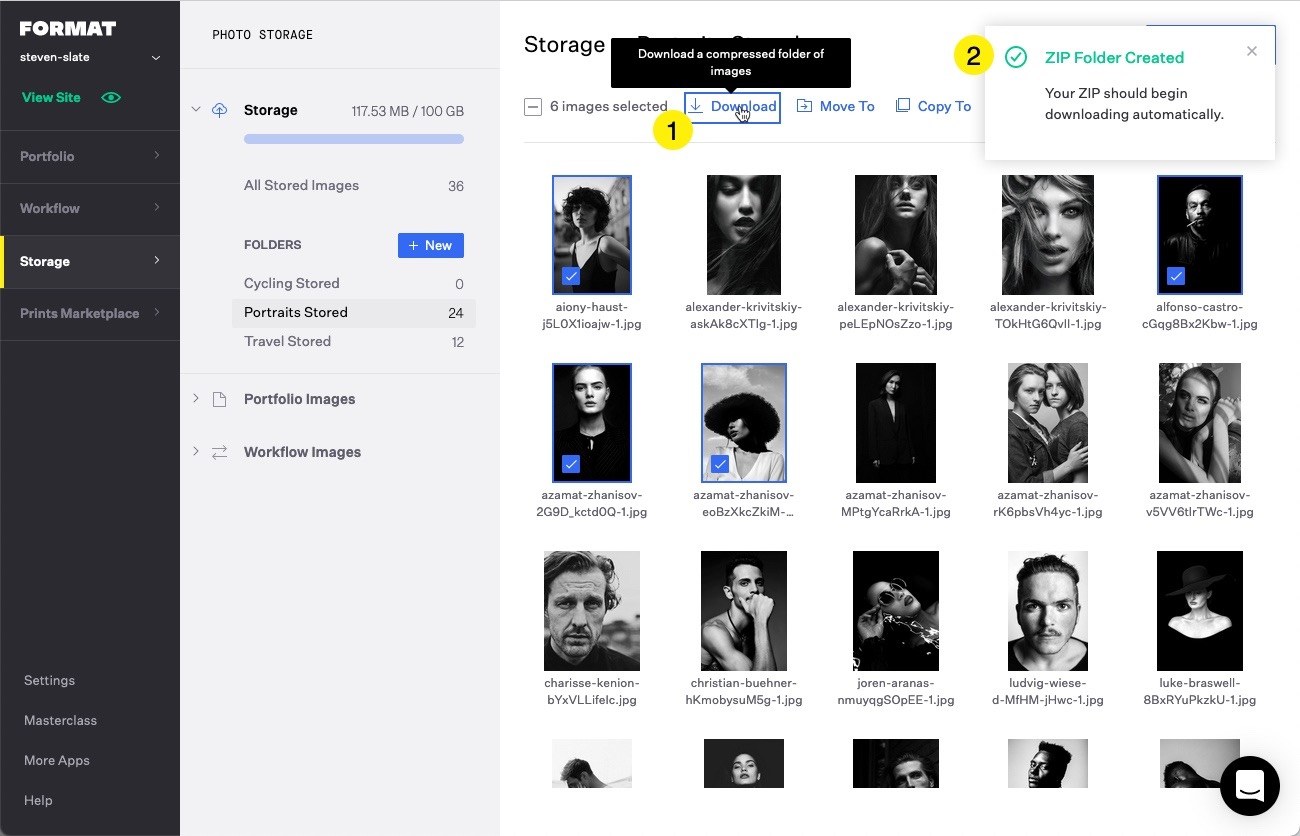
Download images from Storage where available
Select the images and choose Download. Keep the resulting image ZIP; you can leave it zipped inside your final package. It is an image archive, not a complete website.
Add the other material you have
Include available page text, project descriptions, original video and downloads. A text file with embedded video links, the Format URL and any missing material is useful. Format cannot provide downloads of hosted video, so include your originals where available.
Package the files without rebuilding the portfolio
Put the downloads and originals into one ZIP, or add them to your existing Git repository. Include notes about client-only galleries, proofing or commerce. Format themes are platform-specific; Staticbot will help review how to create an independent site.
Upload or import into Staticbot
Use Upload your project for the ZIP or the separate Git import form. Staticbot inspects images, archives, content and source files together and requests review. You do not need to build new galleries before bringing the files to us.
Features to review before moving
- A downloaded image ZIP cannot be deployed as a website by itself.
- Portfolio layout, client-gallery access, proofing and store behaviour need replacement where used.
- A domain change does not recover missing originals or migrate orders and customer access. Resolve those separately before cancelling Format.
Check the preview before changing DNS
Check the image count, gallery sequence, captions and mobile crops. Test downloads and video embeds, and make sure client-only images cannot be reached on the public deployment.
Keep the old account and your backups until the replacement works. You can connect a custom domain you control after testing; the provider’s own subdomain stays with the original platform.
Next: bring your files to Staticbot
Choose the separate ZIP upload or Git import form. Staticbot keeps the package and its inventory for review. Once the website is prepared, the existing hosting guides explain previewing and deployment.
Upload or import your files