
October 14, 2026 · Base44 migration · 4 min read
Will my Excel import still work after I leave Base44?
Base44 quietly runs a handful of features for you: spreadsheet imports, AI answers, Superagents, scheduled workflows, the login page. Here is what replaces each one when your app moves to your own Supabase, and the few that still need a decision.
Ravel works on Staticbot’s migration platform, moving apps built with Lovable and Base44 onto Supabase and hosting their owners control.
Your app has an “Import from Excel” button. Users upload their product catalog, Base44 reads the spreadsheet, and the products show up in the app. You never wrote that code. It's a Base44 feature called ExtractDataFromUploadedFile, and it runs on Base44's servers.
That's the question people ask when they think about moving off Base44: which of the things my app does are actually Base44 doing them? Pages, data, and your own logic are clearly yours. But a long tail of built-in features sits in between, and it isn't obvious what replaces them. This post goes through them one by one.
Spreadsheet and file imports: yes, they keep working
Product catalogs, price lists, contact lists, bank exports, inventory sheets. When Staticbot migrates your app, it deploys a small function into your own Supabase project that takes over Base44's role. Your app makes the same call it always did; only the answer now comes from your project.
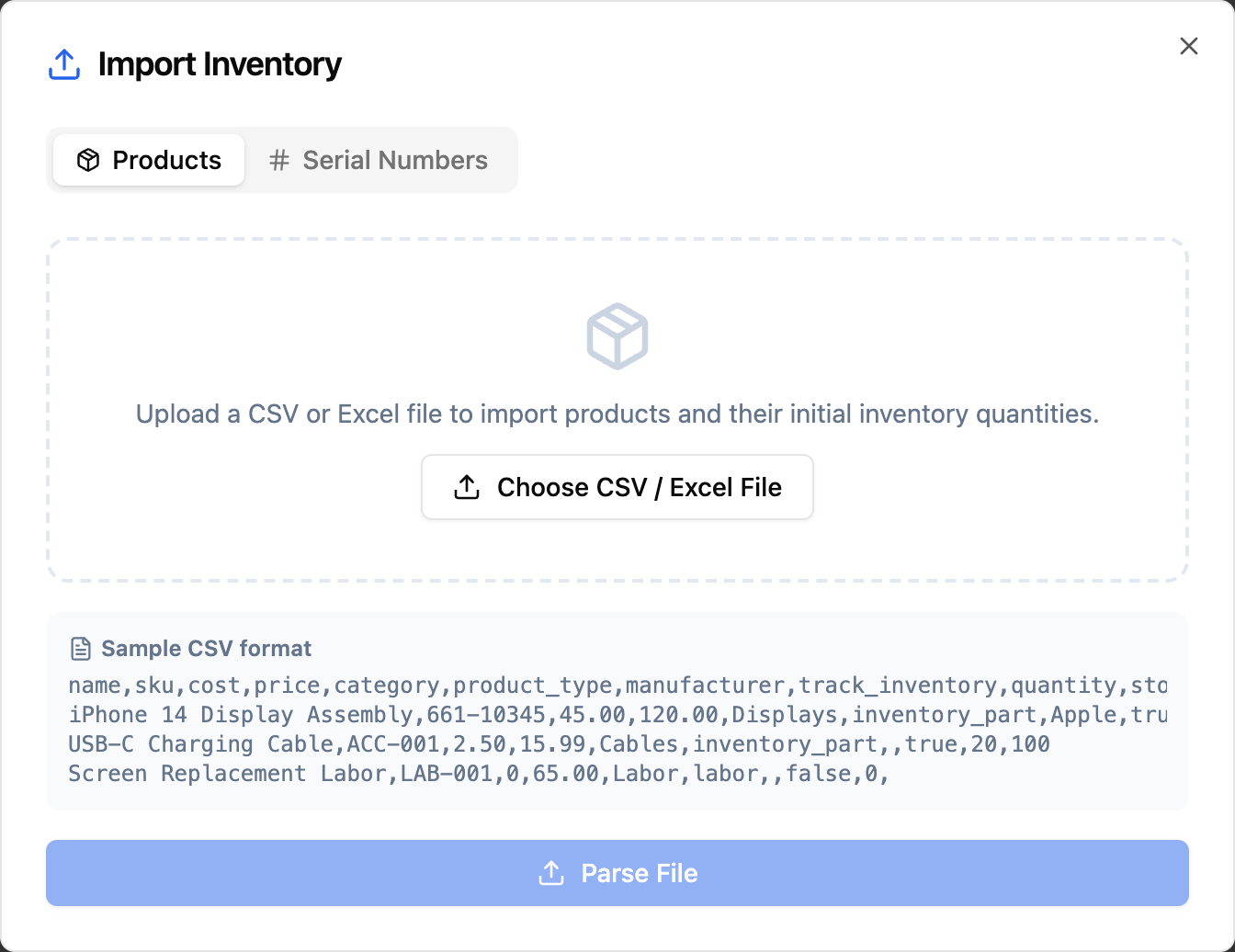
It reads CSV, Excel and plain-text files and returns records in the shape your app asked for. It also handles what real exports look like rather than tidy test files:
- a report title above the column names (“Orders export, October 2026”) is skipped, and the app is told it was;
- dates come through as real dates, not whatever the cell happened to display;
- European number formats like
1.234,50, percentages, and yes/no columns in several languages are converted correctly; - large sheets are converted row by row in your project, not squeezed through an AI's answer, so a thousand-row catalog doesn't get cut off.
The one step that can use AI is matching columns to fields when the names differ, for example “Total (€)” to amount. If your column names already match the fields, no AI is involved at all. For that step you choose who answers: set your own OpenAI key (or DeepSeek, Groq or OpenRouter) as a Supabase secret and it goes straight to that provider, or use Staticbot AI credits.
Not yet: PDFs and photos, such as a scanned invoice or a picture of a receipt. Uploading one gives the user a clear “upload a CSV, Excel or text file” message instead of a broken screen. If your app depends on reading PDFs, the compatibility review will flag it before you migrate.
AI answers (InvokeLLM): yes
Summaries, generated descriptions, “suggest a reply” buttons, and forms that ask the AI for structured answers all go through Base44's InvokeLLM. The same function in your Supabase answers them, with the same choice: your own key or Staticbot AI credits. Structured answers come back in exactly the shape your app expects, so the screens that display them keep working. Attached spreadsheets and text files are read too. Images and PDFs as AI input are not supported yet.
Superagents: yes
Base44's AI agents, the chat assistants you configured with instructions and access to your data, run in your Supabase after the move. Each agent keeps its instructions, the tables it may read or change, and its long-term memory per user. Your app's chat screens keep working, and every user still sees only their own conversations. The AI behind them is the same choice again: your own key or Staticbot AI credits.
Backend functions: yes
The server-side functions you wrote in the Base44 dashboard become Supabase Edge Functions in your project, unchanged. Their calls to Base44's data, auth and AI, including the admin-level asServiceRole calls, go through the open-source compatibility layer to your Supabase instead of Base44.
Scheduled workflows: yes, switched on when you're ready
Base44 Workflows that run on a schedule, such as nightly cleanups or weekly summaries, are recreated in your Supabase. They stay off until you switch your live app over, so a test migration never sends real emails or touches real data twice.
File uploads and the login page: yes
New uploads land in a storage bucket in your Supabase, and the files you already had are copied over. The login screen is a quieter one: Base44 serves it from its own platform, so it isn't in your code at all. The migration generates a real login page in your app. The Base44 vs Supabase compatibility guide covers how accounts move.
What still needs a decision
A few Base44 conveniences have no stand-in yet. Each needs one provider and usually one small server function:
- Sending email (
SendEmail): wire a provider such as Resend, Postmark or SendGrid. - Sending SMS: Twilio or any SMS provider with an HTTP API.
- Image generation: the preview shows a labelled placeholder image; connect an image model for the real thing.
- Reading PDFs and photos: an OCR or document-extraction service.
- Agents on Telegram or WhatsApp: Base44 runs those bots itself; in your app the agents work in its own chat screens.
You don't have to discover these by clicking around. Before anything moves, Staticbot scans your app and lists every built-in feature it uses, with the file and line, sorted into “handled”, “set once” and “needs your attention”. That list also ships in your migration package, written so you can hand it to Claude, Cursor or ChatGPT.
Do I have to host with Staticbot for this to work?
No. The import and AI function lives in your Supabase project, next to your data. Your app's frontend is a standard web build that you can host on AWS, Cloudflare, Netlify, or with Staticbot (what kind of app did I build? explains the options). With your own AI key, nothing in the running app depends on Staticbot. Staticbot AI credits are there for when you'd rather not manage a provider account.
That's the point of moving off a builder: the features keep working, and they now run on infrastructure you own.
Try it on your app
Base44 migrations are free. You get the compatibility review before you commit, and a working preview of your app on your own Supabase before you switch anything. Test the Excel import there with your real files.